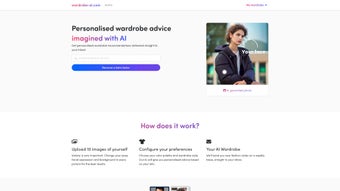

Download Wardrobe AI – Personalized Fashion Recommendations & AI Styling Tool
Overview: The Future of Personal Styling Is Here
Wardrobe AI is a cutting‑edge digital tool that brings the power of artificial intelligence straight to your closet. By simply uploading a handful of photos—whether you’re striking a pose on a city street, smiling at a coffee shop, or lounging at home—Wardrobe AI begins to decode the nuances of your personal style. The platform lets you fine‑tune the experience by selecting preferred color palettes, fabric textures, and overall aesthetic vibes (minimalist, boho, streetwear, etc.).
Once the system has a clear picture, it crafts weekly fashion suggestions that land directly in your inbox, complete with links to comparable items you can purchase instantly.
What sets Wardrobe AI apart from generic fashion apps is its deep learning engine that studies each image’s lighting, background, and pose to understand how you present yourself in real‑life scenarios. The AI then matches those patterns with current trends, seasonal collections, and even niche boutique pieces, ensuring the recommendations feel both fresh and authentic.
Privacy is baked into the workflow: after processing, you can delete your images permanently, and all data is encrypted during transit and at rest.
Whether you’re a busy professional looking to streamline morning outfit decisions, a fashion enthusiast eager to discover hidden gems, or anyone who wants a hassle‑free way to keep their wardrobe up‑to‑date, Wardrobe AI promises a seamless, secure, and highly personalized styling experience.
Key Features That Make Wardrobe AI a Must‑Have Styling Companion
- AI‑Driven Style Analysis: Deep‑learning algorithms evaluate pose, lighting, and background to capture your unique fashion fingerprint.
- Custom Color & Mood Palettes: Choose from preset palettes or craft your own to guide the AI toward the hues you love.
- Weekly Outfit Emails: Curated look‑books delivered every Monday, complete with direct purchase links.
- Multi‑Image Upload: Support for unlimited photos, allowing the AI to learn from varied contexts (work, travel, casual).
- Privacy‑First Architecture: End‑to‑end encryption, on‑device preprocessing, and easy image deletion after analysis.
- Cross‑Platform Access: Web‑based dashboard plus native iOS and Android apps for on‑the‑go style checks.
- Trend Sync: Real‑time integration with major fashion retailers to surface the latest collections that match your profile.
- Smart Wardrobe Integration: Optional plug‑in for smart closets that suggests items you already own before recommending new purchases.
How to Install and Use Wardrobe AI – A Step‑by‑Step Guide
Getting started with Wardrobe AI is straightforward and designed for users of all technical levels. Follow these steps to unlock your personalized fashion feed:
- Visit the Official Site or App Store: Go to wardrobeai.com on any modern browser, or download the free app from the Apple App Store or Google Play Store. The web version works on Windows, macOS, and Linux without any additional software.
- Create an Account: Sign up using an email address or single‑sign‑on (Google, Apple, or Facebook). A verification email ensures your account remains secure.
- Upload Your Images: In the dashboard, click “Add Photos.” You can drag‑and‑drop or select files from your device. For best results, upload at least five pictures showing different outfits, lighting conditions, and backgrounds.
- Set Your Preferences: Navigate to “Style Settings.” Choose your favorite color families, indicate preferred fabrics (cotton, silk, denim), and select a style mood (elegant, sporty, avant‑garde). These inputs sharpen the AI’s recommendations.
- Trigger the Analysis: Press “Start AI Scan.” The system processes your images in the cloud, applying facial and garment detection models. This usually takes 2‑3 minutes, after which you’ll see a summary of your “Style Profile.”
- Receive Weekly Emails: Each Monday, you’ll get a curated email titled “Your Wardrobe AI Picks.” The email contains high‑resolution lookbooks, product links, and a short rationale explaining why each piece matches your profile.
- Shop or Save: Click on any item to be redirected to the retailer’s site. You can add items to a “Wish List” within Wardrobe AI for future reference.
- Maintain Privacy: After the AI finishes, you can delete your original photos with a single click. All data is stored securely, and no third parties have access without your explicit consent.
The entire workflow is designed to be frictionless: you spend a few minutes setting up, and the AI does the heavy lifting each week, delivering fresh, purchase‑ready outfits straight to your inbox. Updates are rolled out automatically, so you always have the latest algorithm improvements without needing to reinstall anything.
Compatibility, Security, and Real‑World Pros & Cons
Wardrobe AI runs on any device with an internet connection. The web portal is fully responsive and works on Windows 10/11, macOS Catalina or later, and most Linux distributions. Native mobile apps are available for iOS 13+ and Android 8.0+. Because the core AI processing happens in the cloud, your device’s hardware specifications have minimal impact on performance.
Pros
- Highly personalized recommendations based on actual photos, not just questionnaire answers.
- Weekly email delivery keeps fashion fresh without overwhelming you.
- Cross‑platform support means you can access your style feed from desktop or mobile.
- Strong privacy controls let you delete source images instantly.
- Integrated shopping links streamline the purchase process.
- Free tier available with optional premium upgrade for deeper analytics and exclusive brand partnerships.
Cons
- Relies on internet connectivity; offline usage is limited to viewing previously downloaded lookbooks.
- AI accuracy improves with more images; users who upload few photos may receive broader suggestions.
- Premium features (e.g., smart closet sync) require a monthly subscription.
- Currently supports only English language interfaces.
- Some high‑fashion retailers may not be part of the partner network, limiting purchase options.
Frequently Asked Questions
How many photos do I need to upload for accurate recommendations?
We recommend uploading at least five high‑quality images that showcase a variety of outfits, lighting conditions, and settings. The more diverse the photos, the better the AI can understand the nuances of your style, leading to more precise weekly picks.
Is my data safe? Can I delete my images after analysis?
Yes. All image uploads are encrypted in transit (TLS 1.3) and at rest. After the AI finishes processing, you can delete the original files with a single click. Wardrobe AI does not retain any personally identifiable information without your explicit consent.
Can I use Wardrobe AI on multiple devices?
Absolutely. Your account syncs across the web dashboard, iOS, and Android apps. Any changes you make—such as updating your style preferences or adding items to your wish list—are reflected instantly on all logged‑in devices.
What happens if I’m not satisfied with the weekly recommendations?
You can provide feedback on each look directly from the email or dashboard. The AI uses this feedback to refine future suggestions. If you need a complete reset, simply clear your uploaded photos and start a fresh analysis.
Is there a free version, and what does the premium upgrade include?
Wardrobe AI offers a free tier that provides weekly lookbooks and basic style profiling. The premium plan—$9.99 per month—adds deeper trend analysis, early access to limited‑edition brand collaborations, smart‑closet integration, and priority customer support.
Conclusion – Why You Should Download Wardrobe AI Today
In a world where fashion trends shift by the hour, having a reliable, AI‑powered stylist in your pocket can be a game‑changer. Wardrobe AI blends sophisticated machine learning with an intuitive user experience, delivering weekly outfits that feel hand‑picked rather than algorithm‑generated. Its strong privacy stance, cross‑platform accessibility, and seamless shopping integration make it a standout among personal styling apps.
Whether you’re looking to refresh a stagnant wardrobe, save time on daily outfit decisions, or simply explore new brands without the overwhelm, Wardrobe AI provides a secure, personalized, and free‑to‑try solution. The premium upgrade adds even more depth for fashion enthusiasts, but the free tier already offers a substantial amount of value.
Ready to let artificial intelligence elevate your style?
Download Wardrobe AI now, upload your favorite looks, and start receiving curated fashion inspiration straight to your inbox. Your next signature outfit is just a click away.



.png)



